

 LinkedIn
You can sell white-label AEO to ten clients this month. Getting changes live on ten sites with different CMSs is the part that can bury your team. Most agencies start with content calendars and prompt tracking. I would start with write access: permission and a practical way to change sites you do not control.
I learned the cost of that gap managing Google Ads accounts. A client could swap a landing page without telling me, and I would be left watching Quality Score tank. AEO gives you the same dependency across a whole roster. Write access decides whether you ship or wait. This guide compares CMS publishing, an edge proxy in front of the site, and dev tickets. For most agency rosters, the proxy wins. Some clients should never go behind one.
Why does onboarding cap AEO before content does?
Every white-label AEO deck sells a familiar bundle: audits, answer-ready FAQs, FAQ and LocalBusiness schema, and citation tracking across AI Overviews, ChatGPT, Perplexity and Gemini, packaged as one resellable service. Buying the words is easy. Shipping them is where rosters stall.
One client is on WordPress with six stale plugins. The next is on Shopify, where you cannot touch the theme. The third has a marketing manager who must file an IT ticket to change a title tag. You can produce the same excellent recommendations for all three and still get three different delivery dates.
That is why I tell agencies to stop counting prompts and start counting days to a live fix. If you cannot change the HTML a bot fetches, your AEO retainer risks becoming a report subscription. Content that never gets published cannot help. Prompt scores cannot tell you whether a proposed change made it onto the site. Solve deployment before you promise a repeatable service.
Which route actually gets you write access?
You have three routes. Judge each on time to live, risk if something breaks, rollback speed, and the changes it lets you make. Do not pick the one that looks neatest in a sales deck; pick the one your team can repeat on client ten.
1. Should you publish through each client’s CMS?
CMS publishing feels clean until you run a roster. You connect WordPress, Shopify and Webflow, then discover a different obstacle in each account: restricted roles, theme locks, app approvals, or a page builder that strips schema. It works fine for blogs you own. Across ten clients, it can make you a part-time plugin support desk.
Skip CMS integration as your default unless four or five clients share a CMS your team already knows. For a closer side-by-side on time to live and rollback, read how write access stalls agency AEO.
2. Should you put an edge proxy in front of the site?
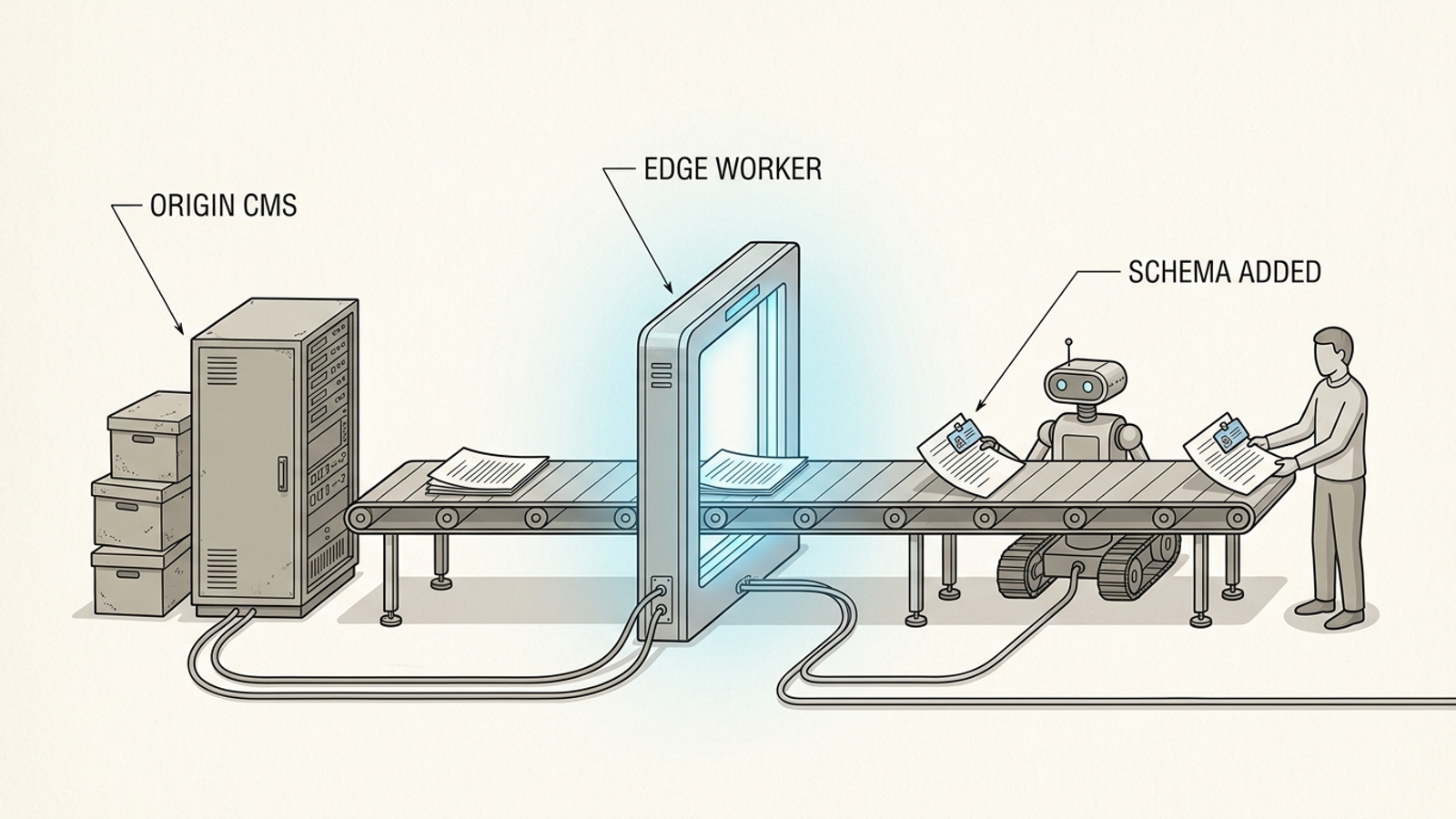
Think of the proxy as a filter the page passes through on its way out. The CMS renders the page as usual. A worker at the CDN edge then intercepts the response and rewrites what matters before a bot or visitor sees it, leaving origin code untouched in the standard edge SEO setup.
No theme edit. No plugin conflict. No wait for a CMS release. That layer can handle title and meta rewrites, canonical fixes, bulk 301s from a CSV, hreflang, robots.txt overrides, schema injection and SEO split tests from the same edge layer. You change the response a bot fetches without changing the system that built the page. For a mixed roster with ordinary sites, that is the route I would test first.
3. Should you send requests to the client’s developers?
Dev tickets work for client one. They struggle at client six because you do not control the queue. Your schema request sits behind a checkout bug, a rebrand, and a freelancer who set up the theme in 2021 and disappeared.
I used to tell clients a ticket would take a week. I was wrong about half of them. A roster with fifteen CMS setups can mean fifteen backlogs, fifteen approvers and fifteen ways for a simple FAQ block to age out. If your delivery model depends on someone else’s developer sharing your priorities, put that dependency in the timeline. Do not hide it in the retainer.
What can an edge proxy actually ship?
A Cloudflare Worker sits between the origin and the visitor. A request comes in, the origin answers as usual, and the worker rewrites the response in flight. Because those edits live at the edge rather than in CMS code, you can deploy or disable them without a CMS migration. Non-developer tools can expose the setup through a UI, with Cloudflare Workers commonly used for this pattern.
For schema, the worker can append a JSON-LD block for FAQ, HowTo, Article or LocalBusiness to pages matching a path rule. For page signals, it can rewrite titles, canonicals and hreflang in the response, or apply a robots.txt override. The CMS owner does not have to open the CMS for each change.
Publishing pages at the edge is the part agencies miss. You do not need a WordPress draft to ship an answer page: the worker can serve a new URL from stored HTML while the origin keeps serving everything else. That gives you a route to FAQ hubs and location pages on a locked-down build. One deployment layer can replace a pile of CMS logins. It does not replace judgment about which pages should exist or who approves them.
How do you know an AI crawler saw the change?
The proxy earns its keep again in measurement. Browser analytics cannot see bots that do not execute JavaScript. One log study counted 500M+ GPTBot fetches with zero JavaScript execution; GA pixels never fired. If GA4 is your only proof of a visit, you can report zero when a crawler fetched the page.
At the edge, log the path, status and IP for crawler requests and validate bot identity rather than trusting a user-agent string alone. That is the same-layer measurement pattern used with Cloudflare Workers or Fastly. It lets you track verified fetches by GPTBot, ClaudeBot and PerplexityBot, then compare crawl activity with referrals. A fetch does not prove a visibility lift, but it tells you whether the crawler reached a changed page before you claim one. No verified fetch, no credit taken.
How do you roll out the first client domain?
Make client one boring on purpose. The goal is not a performance story by Friday. It is a handoff you can repeat for client ten without a developer on the call. Keep this afternoon onboarding walkthrough beside the checklist.
Step 1: What do you ask the client for?
Ask for the DNS routing change needed to put the domain through your edge setup, or delegated access so you can arrange it. Explain the proposed route before anyone changes it. Once traffic passes through the worker, later response edits can ship from your side instead of entering a new CMS ticket queue.
Keep the handoff email to five points:
- The change: the DNS routing or nameserver change you need, and the account it points to.
- The boundary: you will not need their CMS, theme, plugin or hosting login for these edge changes.
- The time: allow for their approval and DNS propagation; do not promise an exact go-live time.
- The rollback: disabling the worker route removes its response edits; reversing DNS routing is a separate change.
- The owner: name the person their IT team can contact.
That is a smaller ask than collecting a fresh set of CMS credentials for every fix. It is still a site-routing change, so treat it like one.
Step 2: How do you stage and undo a change?
Never push rewrites straight to production. Route a staging hostname through the worker first. Confirm the origin still answers, the injected JSON-LD validates, and the 301 map fires where it should. Then test the rollback: disable the worker route and confirm the response no longer contains your edits.
Log the rollback test before launch. You want to show exactly how to remove a bad edge change, not make a grand promise that every DNS reversal happens in seconds. Nothing has been written into the CMS, which makes this rollback much cleaner than unwinding changes across fifteen admin panels.
Step 3: What must happen in the first 14 days?
Run each suitable domain through the same two-week gate. I use the 14-day ship test as a pass-fail on time to a live fix and a verified bot fetch, not prompt scores.
- Days 0 to 3: check crawl access. Set the intended edge robots rule, then verify crawler identity and confirm successful fetches for GPTBot, ClaudeBot and PerplexityBot in your edge logs.
- Days 4 to 7: ship structured data. Inject Organization plus FAQ or LocalBusiness JSON-LD on the top five revenue URLs, where relevant, and validate each page.
- Days 8 to 14: publish the first pages. Serve two or three answer pages at the edge and watch for return bot visits before claiming anything moved.
If day 14 arrives with no verified fetch, investigate deployment and crawl access before rewriting more content. The gate keeps a content team from polishing pages the intended crawlers have not reached.
How do you repeat this across 15 domains?
Going from three domains to fifteen is an operations problem, not a talent contest. Standardise the onboarding pack: the same DNS email, staging checklist, rollback test and 14-day gate. I would run new domains in weekly batches of three so the team copies reviewed rules rather than rebuilding them, with one person owning verification.
What the deck calls synergy, I call not doing the same DNS call fifteen different ways. If onboarding takes a new shape for every ordinary client, you do not yet have a repeatable service. Make exceptions for the sites that need them, not because nobody wrote down the process.
How do you report and price it without losing the margin?
White-label AEO only works as a service if the client receives a clear account of what you shipped. Put your logo and domain on the reports. List the fixes under your name, alongside citation tracking across the AI engines. Do not let a prompt score stand in for a published change.
Price per domain, not per prompt. Wholesale local AEO typically runs $300 to $800 a month, resold at 2x to 3x for a stated 45 to 65% gross margin before account time drags net margin lower. Another entry anchor: one vendor lists AEO Starter at $199 a month wholesale, with suggested resale at $499 to $799. Those are pricing anchors, not a substitute for costing your own delivery. Per-prompt caps create a fresh negotiation when tracking expands; per-domain pricing gives the work a steadier unit.

Which clients should you never put behind a proxy?
I would use the proxy for many local, home-service and SMB ecommerce sites. I would keep three kinds of client off the standard pack:
- Locked-down enterprise IT. If DNS changes need a long security review and a third-party worker is a non-starter, do not sell an edge rollout as the fast path. Keep the client on dev tickets, price the extra coordination, and put slower ship dates in writing.
- Regulated pages. A rewritten FAQ can be a compliance event when it makes health, legal or financial claims. A layer that can publish in seconds is a liability if nobody owns approval. Use the client’s sign-off process before anything goes live.
- Fragile caching or checkout stacks. Custom Varnish rules, signed cart cookies and HTML personalisation can conflict with a worker. Blank carts or doubled content are not worth a faster FAQ launch. Keep these clients on CMS publishing or tickets until the implementation is safe.
Speed is not the deciding factor when the site cannot safely accept the route. Charge for the friction instead of pretending these clients fit the same onboarding pack.
What belongs in the contract?
Name the deployment method before you promise a visibility lift. The client needs to approve how you will change the site; your timeline depends on that decision. I would put four items in the retainer:
- Deployment: the agreed DNS and edge routing, with the CMS untouched for edge changes unless the client chooses another method.
- Scope: titles, canonicals, redirects, robots rules, schema and edge-served answer pages.
- Rollback and ownership: how you disable edge edits, how DNS changes are reversed, and confirmation that origin code stays with the client.
- Measurement: verified AI bot fetches from edge logs as delivery evidence, with prompt scores reported separately rather than used as proof of a shipped fix.
Put per-domain pricing on the same page. Price enterprise and regulated work for the approvals and slower delivery they require. The contract should describe the work you can actually control.
Which model should you choose today?
Default to an edge proxy for standard SMB, local-service, and suitable Shopify or WordPress builds where the owner wants changes without repeated IT calls. Use CMS publishing when several clients share a CMS your team already supports. Use dev tickets for enterprise IT, regulated claims and fragile checkout stacks, with the slower dates in writing.
If you do not want to run workers, DNS routing and bot-log plumbing yourself, that execution layer is what groas runs under your brand: one connection per client, continuous fixes, logged actions and weekly reports ready to forward.
First thing today: pick one friendly client, send the five-point DNS email, and run the 14-day gate. One live domain teaches you more than ten decks about prompt coverage.