

 LinkedIn
A paid AI visibility dashboard can tell you which prompts mention your brand and which competitors get cited. Build the first version in a spreadsheet, and you can see those answers before you sign a contract.
In An Open Letter to the Owner About to Buy an AI Visibility Dashboard, we asked you to pause before buying. This is what to do during that pause: make a working tracker, find out what a paid tool would add, and see the work neither version will ship for you.
At the end, you will have four connected tabs: a buyer-prompt library, a repeat-sampling log, a mention scorecard, and a content-gap sheet tied to URLs you can update. Set aside an afternoon to configure them. Before starting, gather:
- A blank Google Sheets or Microsoft Excel workbook. The optional script below requires Google Sheets.
- Access to the AI surfaces your buyers use: ChatGPT, Perplexity, and Google AI Overviews.
- Search query exports from Google Search Console or Google Ads, plus CRM deal-loss notes from the last 90 days. Sales-call recordings and support tickets help too.
- An optional Perplexity API key if you want to automate that engine’s weekly runs.
Step 1: Freeze a prompt list you can test again
Action: Create a tab named Prompt_Library with these headers in order: Prompt_ID, Prompt_Text, Intent_Type, Target_URL. Add 25 to 50 questions drawn from converting queries, sales calls, support tickets, and deal-loss notes. Give each row a unique ID such as P01 and assign one intent:
- Problem: The buyer describes a pain without naming a product category, as in
how to reduce b2b churn before renewal. - Category: The buyer seeks a type of product or service, as in
best autonomous paid search software for agencies. - Comparison: The buyer weighs named alternatives, as in
competitor_a vs competitor_b. - Brand: The buyer names you, as in
is brand_name legit. Keep these below 15% of the list so they do not inflate the overall picture.
Paste the page that directly answers each question into Target_URL. Leave it blank when no suitable page exists. Then stop editing prompt wording during your first measurement cycle; otherwise, a change in your score may just be a change in the questions.
Expected result: A fixed set of buyer questions with IDs, intent labels, and a plausible destination page where one exists. Aim for 30 to 50 after you have removed duplicates.
Mistake to avoid: Asking an LLM to invent polished prompts nobody uses. A high mention rate on boardroom language is not buyer visibility. Use the questions buyers brought to you.
Step 2: Log repeated answers, not one lucky answer
Action: Create Raw_Log with these headers, in order: Run_Date, Engine, Prompt_ID, Run_Number, Brand_Mentioned, Brand_Cited, Mention_Position, Competitors_Named, Citations_Observed. For each prompt, run the same wording three times on each available engine. Start fresh private sessions between browser runs to reduce carry-over context, and record what you see rather than what you think the answer meant.
Enter TRUE or FALSE separately for Brand_Mentioned and Brand_Cited. A recommendation naming your product but linking only to a review site is a mention, not a citation to your site. Record the named competitors and cited URLs as well. In Mention_Position, note where the brand appears in the answer using one consistent convention; do not confuse a character offset with a ranking.
That separation matters: mentions often appear without explicit citation links. Answers can also vary across identical prompts. Three runs give you a useful first view of that variation, not proof that a zero-out-of-three result will stay at zero.
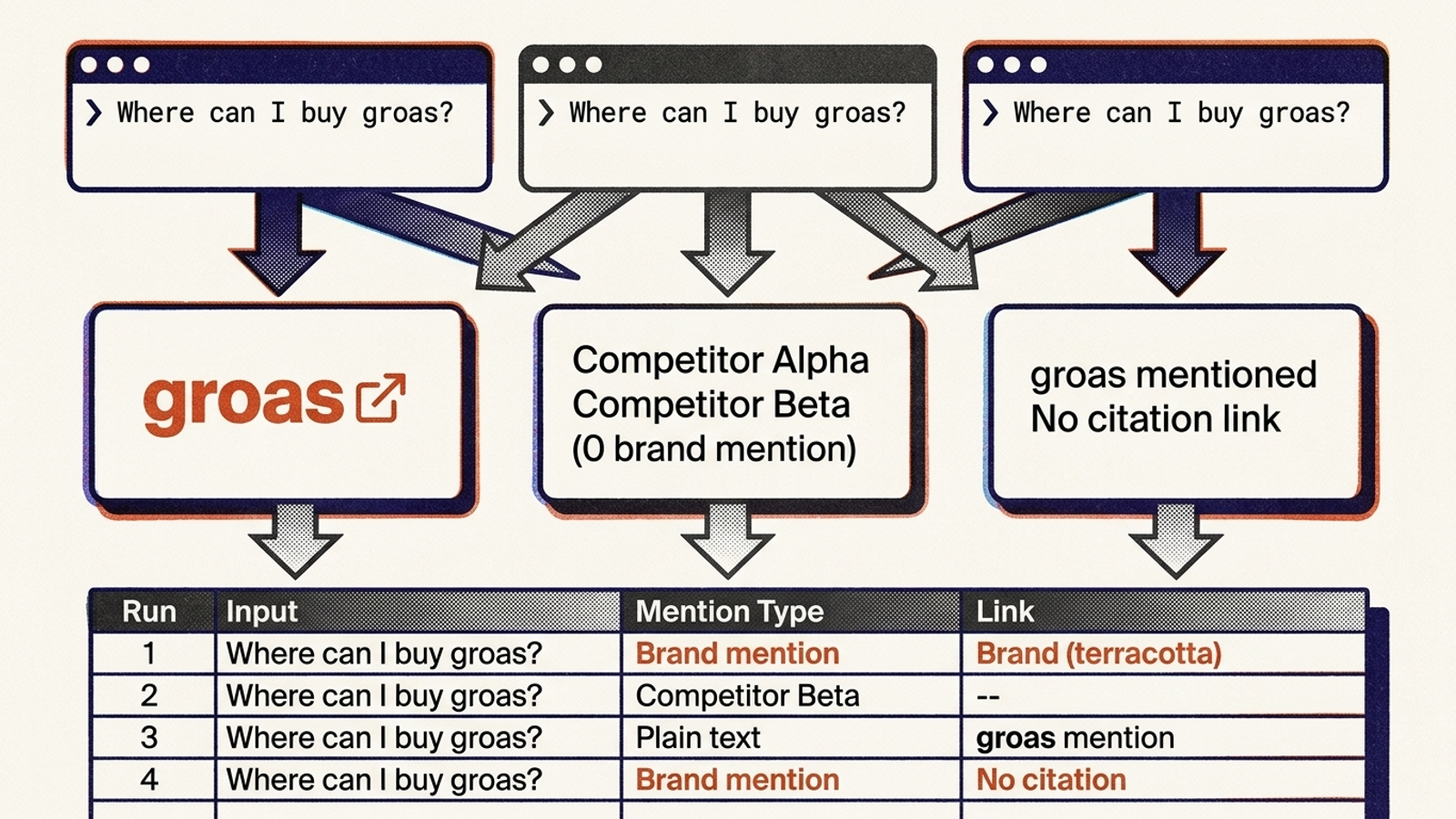
Expected result: Thirty prompts × three engines × three runs produce 270 rows in a complete manual cycle. Each row preserves one answer’s mention flag, citation flag, competitors, and URLs. If an engine does not return an answer you can test, record that limitation separately rather than inventing a FALSE result.
Mistake to avoid: Overwriting last week’s rows or assuming a private window makes every answer identical for every user. Keep the history. The trend is worth more than a screenshot of a good Tuesday.
Step 3: Automate one engine without pretending it is all three
Action: If 270 manual queries each week are too much, automate the Perplexity portion in Google Sheets. Open Extensions > Apps Script. Paste the code below, replacing yourbrand and yourdomain.com with your brand name and domain. It sends each prompt to the Perplexity API three times and appends successful responses to Raw_Log.
function runAiMentionAudit() {
  const book = SpreadsheetApp.getActiveSpreadsheet();
  const promptsSheet = book.getSheetByName("Prompt_Library");
  const logSheet = book.getSheetByName("Raw_Log");
  const apiKey = PropertiesService.getScriptProperties()
    .getProperty("PERPLEXITY_API_KEY");
  if (!apiKey) throw new Error("Set PERPLEXITY_API_KEY first.");

  const brandName = "yourbrand".toLowerCase();
  const brandDomain = "yourdomain.com".toLowerCase();
  const lastRow = promptsSheet.getLastRow();
  if (lastRow < 2) return;

  const prompts = promptsSheet.getRange(2, 1, lastRow - 1, 2).getValues();
  const date = new Date().toISOString().split("T")[0];

  prompts.forEach(([promptId, promptText]) => {
    if (!promptId || !promptText) return;

    for (let run = 1; run <= 3; run++) {
      const response = UrlFetchApp.fetch(
        "https://api.perplexity.ai/chat/completions",
        {
          method: "post",
          headers: {
            Authorization: `Bearer ${apiKey}`,
            "Content-Type": "application/json"
          },
          payload: JSON.stringify({
            model: "sonar",
            messages: [{ role: "user", content: promptText }]
          }),
          muteHttpExceptions: true
        }
      );

      if (response.getResponseCode() !== 200) {
        throw new Error(`API request failed: ${response.getResponseCode()}`);
      }

      const data = JSON.parse(response.getContentText());
      const content = data.choices?.[0]?.message?.content || "";
      const citations = data.citations || [];
      const cited = citations.some(url => {
        try {
          const host = new URL(url).hostname.toLowerCase();
          return host === brandDomain || host.endsWith(`.${brandDomain}`);
        } catch (error) {
          return false;
        }
      });

      logSheet.appendRow([
        date, "Perplexity", promptId, run,
        content.toLowerCase().includes(brandName),
        cited, "", "", citations.join(", ")
      ]);
      Utilities.sleep(1200);
    }
  });
}
In Apps Script, open Project Settings > Script Properties > Add script property. Set Property to PERPLEXITY_API_KEY and paste your key into Value. Run runAiMentionAudit once and authorize it. For a weekly schedule, open Triggers > Add Trigger; choose that function, Time-driven, Week timer, and your preferred time.
Expected result: A 30-prompt library adds 90 Perplexity rows per successful cycle. The script records mentions and cited domains, but leaves Mention_Position and Competitors_Named empty. Fill those manually if you need them. It does not collect consumer ChatGPT answers or Google AI Overviews. Those still need separate testing; an API answer is not a browser screenshot. Search teams use Apps Script routines for recurring collection, but the collection method always defines what the data represents.
Mistake to avoid: Scheduling the job before checking a single run, then treating a failed request as a genuine absence. Test the key and inspect the added rows first. If a larger prompt set times out, split it into batches; do not turn missing rows into zero mention rates. Spot-check your top 10 commercial prompts in consumer interfaces monthly.
Step 4: Make mention and citation rates disagree visibly
Action: Create Scorecard with these headers: Prompt_ID, Prompt_Text, Intent_Type, ChatGPT_Mention_Rate, Perplexity_Mention_Rate, AIO_Mention_Rate, Total_Mention_Rate, Total_Citation_Rate, Primary_Competitor_Named.
Link the first three cells of row 2 to Prompt_Library, then copy them down:
A2: =Prompt_Library!A2
B2: =Prompt_Library!B2
C2: =Prompt_Library!C2
Put the following formulas in D2:H2 respectively and copy them down. Blank results mean no runs have been logged for that engine or prompt; they are not zeros.
D2: =IFERROR(COUNTIFS(Raw_Log!$C:$C,$A2,Raw_Log!$B:$B,"ChatGPT",Raw_Log!$E:$E,TRUE)/COUNTIFS(Raw_Log!$C:$C,$A2,Raw_Log!$B:$B,"ChatGPT"),"")
E2: =IFERROR(COUNTIFS(Raw_Log!$C:$C,$A2,Raw_Log!$B:$B,"Perplexity",Raw_Log!$E:$E,TRUE)/COUNTIFS(Raw_Log!$C:$C,$A2,Raw_Log!$B:$B,"Perplexity"),"")
F2: =IFERROR(COUNTIFS(Raw_Log!$C:$C,$A2,Raw_Log!$B:$B,"AIO",Raw_Log!$E:$E,TRUE)/COUNTIFS(Raw_Log!$C:$C,$A2,Raw_Log!$B:$B,"AIO"),"")
G2: =IFERROR(COUNTIFS(Raw_Log!$C:$C,$A2,Raw_Log!$E:$E,TRUE)/COUNTIF(Raw_Log!$C:$C,$A2),"")
H2: =IFERROR(COUNTIFS(Raw_Log!$C:$C,$A2,Raw_Log!$F:$F,TRUE)/COUNTIF(Raw_Log!$C:$C,$A2),"")
Use AIO consistently as the engine label when logging Google AI Overviews. Format D:H as percentages. Add conditional formatting for values below 33% in red, 33% through 66% in yellow, and 67% or above in green. In column I, enter the competitor that appears most often in your logged runs; leave it blank until you have checked Competitors_Named.
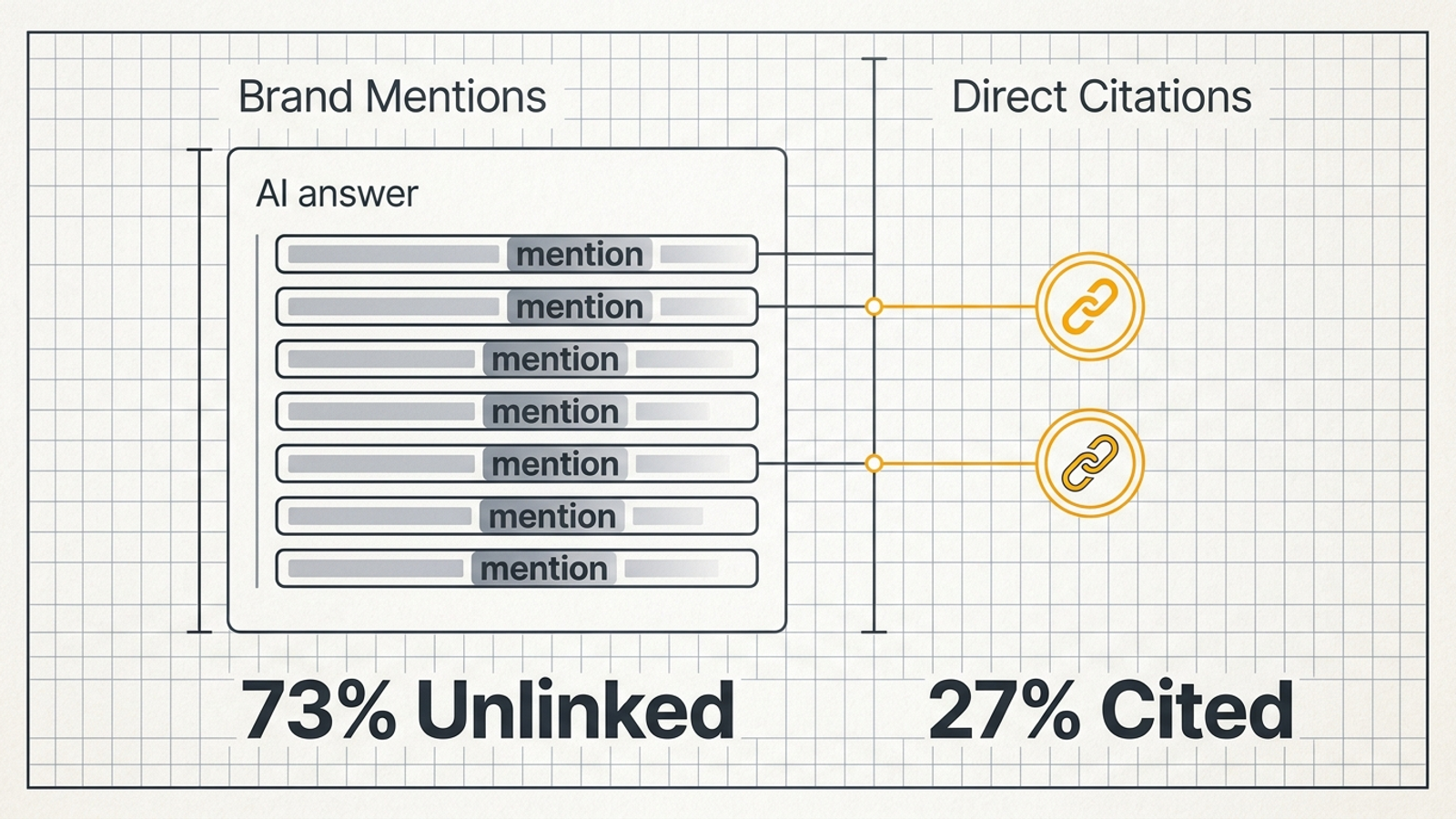
Expected result: Each prompt shows where your brand appears, where your domain earns a citation, and which engines you have actually sampled. Sort by Total_Citation_Rate to find questions worth inspecting. An API-only run should populate Perplexity and overall rates while leaving unsampled engine rates blank.
Mistake to avoid: Calling an unlinked mention a citation. If eight of ten answers name you but none links to your domain, the mention rate is 80% and the citation rate is 0%. Keep both numbers. They describe different gaps.
Step 5: Turn missing citations into page work
Action: Create Content_Gaps with six headers: Prompt_ID, Target_URL, Winning_Competitor_URL, Missing_Structural_Element, Fix_Type, Implementation_Notes. Filter Scorecard for sampled prompts with Total_Citation_Rate below 34%, then copy those IDs into the new tab. Bring across each Target_URL and inspect the URLs in Citations_Observed before filling Winning_Competitor_URL.
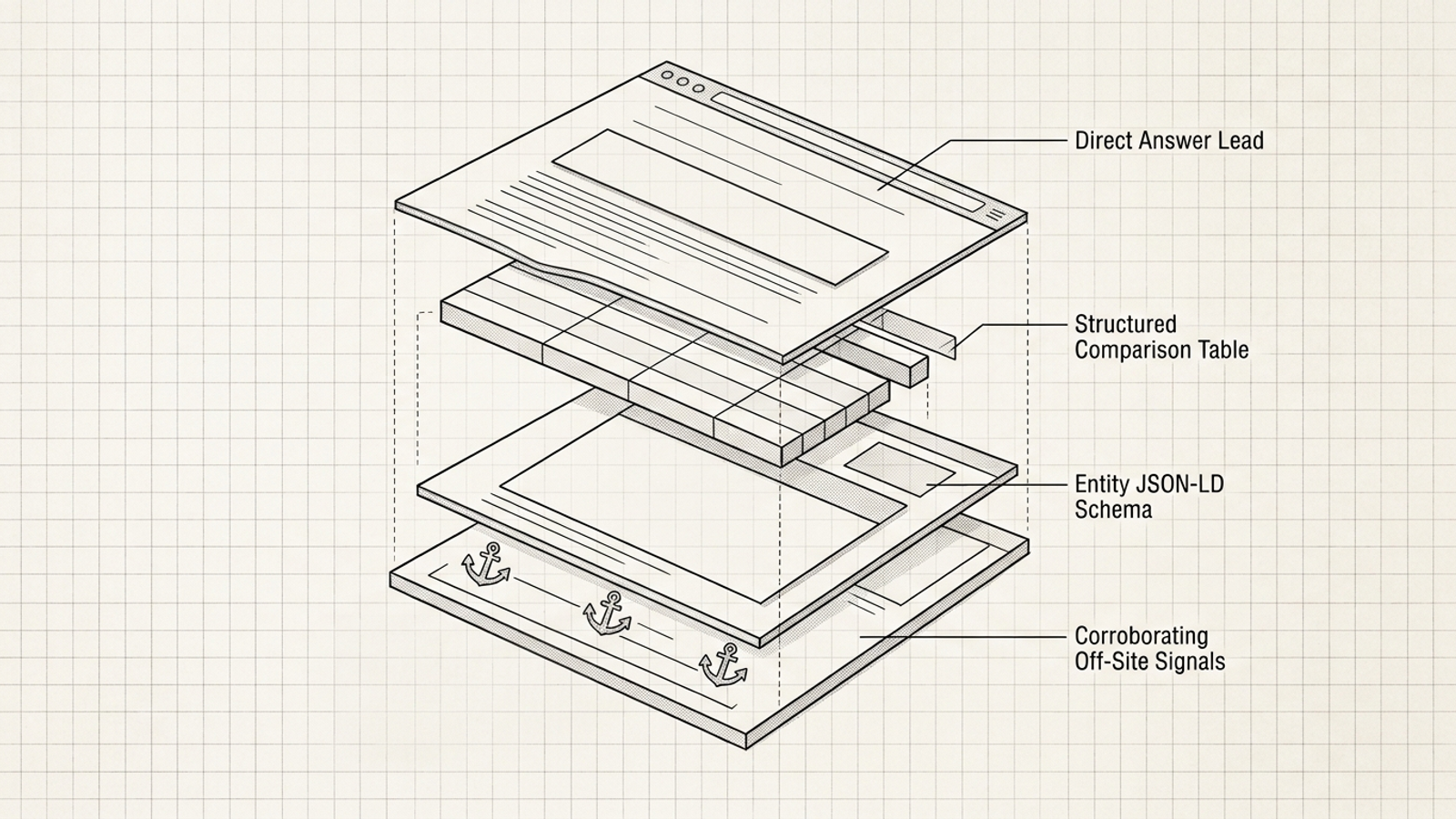
Open your page beside a cited competitor page. Check for four things, but do not assume any one of them caused the citation:
- A direct answer near the relevant heading, rather than several introductory paragraphs before the point.
- A usable comparison table when the prompt asks buyers to compare features, prices, or specifications.
- Appropriate Organization or Product schema with verified
sameAslinks, where it fits the page. - Independent third-party presence that supports the claim the page makes.
These are inspection points drawn from citation-gap analysis, not a recipe guaranteed to win an answer. If your page is inaccessible or unindexed, diagnose that gap before writing more content. Otherwise, give Fix_Type a concrete value: Rewrite_H2_Lead, Insert_Comparison_Table, Add_Entity_Schema, or Publish_New_Page. In Implementation_Notes, say what will change on which page.
Expected result: A list of prompts, URLs, and proposed edits someone can inspect and ship. A blank Target_URL points to a missing page; an existing page with no direct comparison may call for a table instead.
Mistake to avoid: Writing 2,000 words of generic copy because a dashboard said “content gap.” If the cited competitor page answers a comparison with a table, inspect your own comparison first. Another five-paragraph introduction is unlikely to help.
Where the homemade tracker starts to strain
Action: Before expanding the library, calculate the runs you are committing to: prompts × engines × repeats. At 100 prompts, three engines, and three runs, that is 900 queries per cycle. At ninety seconds of manual work each, collection alone takes 22.5 hours.
Expected result: A clear point at which automation or paid collection saves real labor. A spreadsheet costs no dashboard subscription, but manual sampling is not free time. Apps Script has execution limits too, and API results do not capture every localized layout or widget in consumer interfaces.
Mistake to avoid: Comparing subscription cost with a fictional zero-cost manual process. A paid tracker can take on collection and time-series reporting at scale. Pay for the work it removes, not for the thrill of seeing the same missing citation in a nicer chart.
Add the two columns a dashboard cannot fill
Action: Add Fix_Owner and Date_Shipped as columns G and H in Content_Gaps. Assign an owner to each proposed edit. Enter a shipping date only after the page change is live.
Expected result: Your gap sheet now separates diagnosis from delivery. A commercial alert can tell you a competitor won a citation; it cannot fill in a date for a page your team never updated.
Mistake to avoid: Treating a growing list of detected gaps as progress. I care less about how many rows a tool discovers than how many fixes make it onto the site.
Decide whether to keep building or buy collection
Action: Review one full cycle, the hours it took, and the owners assigned to the resulting fixes. Then make the call:
- Keep the sheet if you have fewer than 40 core commercial prompts and need a baseline before adding overhead. Review the scores weekly, but count collection time separately.
- Skip a diagnostic dashboard for now if nobody can act on the gaps. Faster alerts will only make the unattended backlog grow faster.
- Look at groas if you want execution tied to search outcomes rather than another reporting layer. Its autonomous growth engine works across paid and organic search, with specialized models handling ongoing campaign and content work while a named strategist sets direction and guardrails. That is a different purchase from a dashboard that stops at diagnosis.
Expected result: A decision based on your sampling workload and ability to ship fixes, not on a demo chart. The sheet tells you what you need before you pay for more of it.
Mistake to avoid: Buying automation to avoid assigning an owner. Automation can collect answers; it cannot make an unshipped page update live.
Verify the tracker, then change one page
Action: Run five prompts across all three engines, three times each. Check Raw_Log for 45 rows with dates, engine labels, prompt IDs, run numbers, and explicit TRUE or FALSE values in columns E and F. Check Scorecard for rates between 0% and 100%, blanks where no engine was sampled, and no #DIV/0! errors. Confirm the color rules apply to actual percentages. If you use the script, test its Perplexity rows separately; it should add 15 rows for those five prompts, not 45.
Expected result: You can trace a score back to the answers that produced it. Now sort Content_Gaps by intent and pick one high-value Category prompt with a 0% citation rate and a cited competitor page. Inspect that page, make one justified structural change to your own target URL, and record its owner and shipping date. Sample the prompt again seven days later to see whether your domain appears.
Mistake to avoid: Changing all 30 pages before you know whether the log works. Verify the measurement, ship one fix, then measure again. Tracking finds the work. Shipping it is the point.