

 LinkedIn
Build a tracker, not another visibility score
A screenshot saying your brand appeared in an AI answer tells you almost nothing. A fixed prompt, sampled repeatedly, tells you whether that appearance holds up.
In 7 Myths That Make AI Visibility Reports Look More Certain Than They Are, we looked at the problem with confident-sounding reports. This is the second look: how to get numbers you can inspect without buying a dashboard score. By the end, you will have a fixed buyer-prompt set, a scheduled collection workflow for ChatGPT, Gemini and Google AI Overviews, separate mention and citation records, a way to verify crawler hits, and a per-prompt rate with an uncertainty interval.
Before starting, get these five things ready:
- An OpenAI API key for the Responses API with
web_search, and a Google AI Studio key for thegoogle-genaiSDK with Google Search grounding. - A programmatic AI Overview source, such as DataForSEO’s SERP API or SerpApi’s Google AI Overview engine.
- SQLite or PostgreSQL for the results.
- CDN or web-server logs containing IP addresses, paths, status codes and user agents.
- Python 3.10 or higher with
requests,google-genai,openaiandscipyinstalled.
One boundary matters throughout: search-grounded API responses are not replicas of consumer chats. The web apps may use memory, location signals, hidden instructions or different routing. The API gives you a repeatable, auditable benchmark, not a claim that you have reproduced every buyer’s screen. Keep that distinction in the report.
Step 1: Freeze prompts that sound like buyers
Action: Export the last 90 days of converting search terms from Google Ads and remove queries containing your brand. Check CRM deal-loss notes and sales-call transcripts for the language buyers use before they know you exist. Put 20 to 40 prompts in prompts_v1.json, split across problem, category, comparison and brand intents. Give each prompt an immutable ID and list the competitor entities you want to recognise.
[
  {
    "id": "p_01",
    "prompt": "best autonomous google ads management software for b2b saas",
    "intent": "category",
    "competitors": ["optmyzr", "skai", "marin software"]
  },
  {
    "id": "p_02",
    "prompt": "how to lower google ads cpa without hiring a ppc agency",
    "intent": "problem",
    "competitors": ["wordstream", "adzooma"]
  },
  {
    "id": "p_03",
    "prompt": "groas vs traditional ppc agency retainers",
    "intent": "comparison",
    "competitors": ["disruptive advertising", "klientboost"]
  }
]
Expected result: A versioned prompt file you can leave unchanged for at least 90 days. Keep branded prompts in an isolated diagnostic group; they do not belong in the unbranded visibility rate. If you need new angles, create prompts_v2.json and continue the original benchmark alongside it.
Mistake to avoid: Generating 300 synthetic prompts or quietly rewriting a prompt after a bad result. Both make a rising mention rate hard to interpret. If your brand appears in 95% of branded queries and 8% of category queries, the first number is mostly an echo.
Step 2: Run each prompt five times per engine
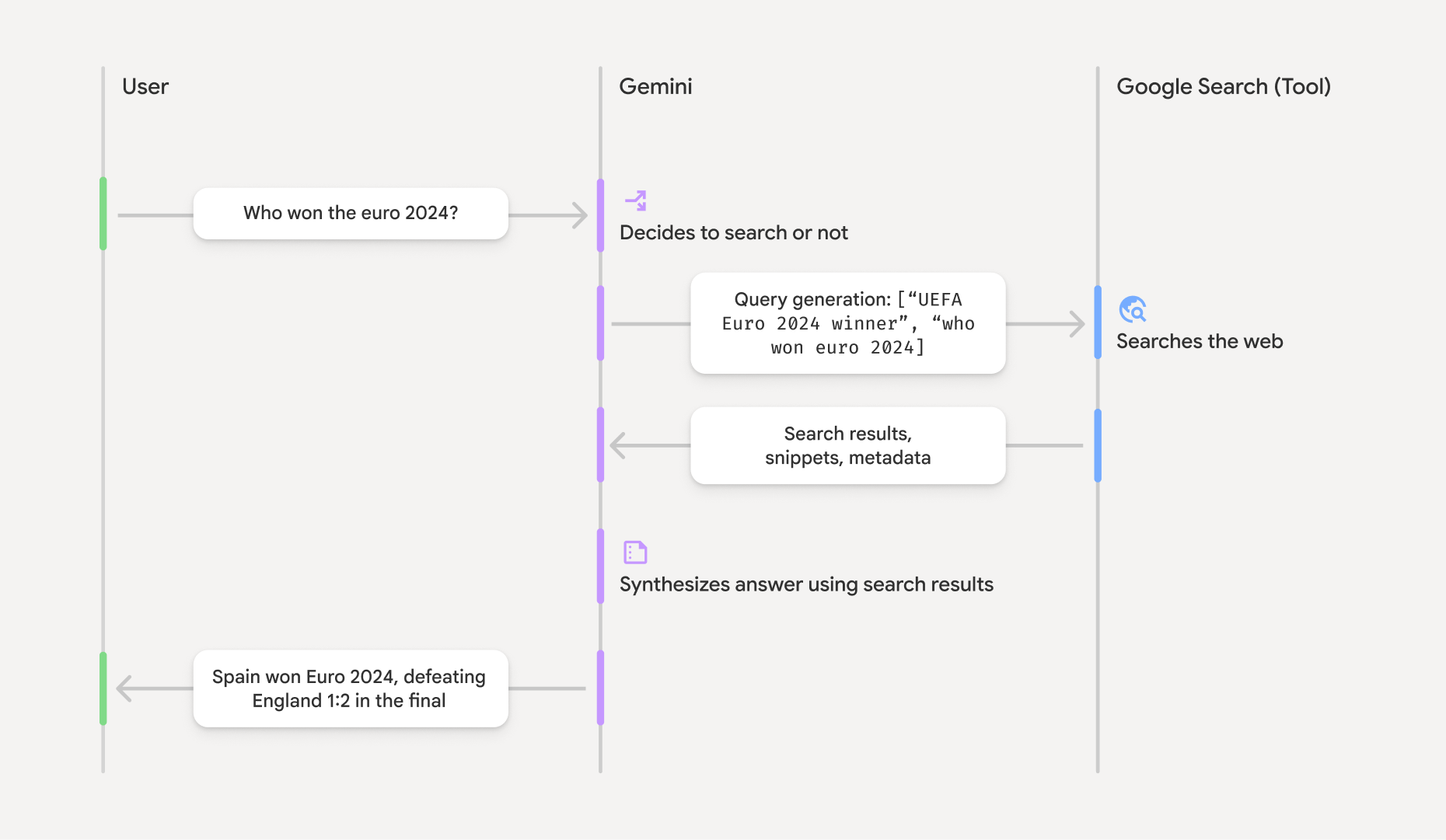
Action: Sample every prompt five times across several hours on each engine. For ChatGPT, call the OpenAI Responses API with web_search. For Gemini, attach Google Search grounding through the google-genai SDK. Save the full response, not just the displayed text.
import os
from google import genai
from google.genai import types
from openai import OpenAI

openai_client = OpenAI(api_key=os.environ["OPENAI_API_KEY"])
gemini_client = genai.Client(api_key=os.environ["GEMINI_API_KEY"])

def query_chatgpt(prompt: str) -> dict:
    response = openai_client.responses.create(
        model="gpt-4o",
        input=prompt,
        tools=[{"type": "web_search"}]
    )
    citations = []
    for item in response.output:
        for part in getattr(item, "content", []) or []:
            for annotation in getattr(part, "annotations", []) or []:
                if getattr(annotation, "type", None) == "url_citation":
                    citations.append(annotation.url)
    return {
        "text": response.output_text,
        "citations": citations,
        "raw": response.model_dump(mode="json")
    }

def query_gemini(prompt: str) -> dict:
    response = gemini_client.models.generate_content(
        model="gemini-2.5-flash",
        contents=prompt,
        config=types.GenerateContentConfig(
            tools=[types.Tool(google_search=types.GoogleSearch())],
            temperature=0.2
        )
    )
    citations = []
    for candidate in response.candidates or []:
        metadata = getattr(candidate, "grounding_metadata", None)
        for chunk in getattr(metadata, "grounding_chunks", []) or []:
            web = getattr(chunk, "web", None)
            if web and web.uri:
                citations.append(web.uri)
    return {
        "text": response.text or "",
        "citations": citations,
        "raw": response.model_dump(mode="json")
    }
For Google AI Overviews, use your SERP provider rather than assuming the answer card will appear in fetched HTML. With SerpApi’s approach, inspect the primary response for ai_overview and its page_token, then request google_ai_overview promptly while that token remains usable. Normalise the answer text and reference URLs into the same text and citations fields. Record a missing Overview as missing, not as an answer that omitted your brand.
Expected result: Five timestamped, grounded responses per prompt and engine, each retaining its raw payload. Check the payloads before you schedule the job: if an engine returns no source metadata, you need to know whether it produced no citations or your extraction broke.
Mistake to avoid: Treating one response as the answer. Retrieval and generated wording can change between runs. An ungrounded model call is a different test again; do not mix it into a grounded-search series.
Step 3: Count names and links separately
Action: Scan answer prose for brand aliases using word boundaries. Parse citation URLs into hostnames, then compare domains rather than page paths. Apply the same mention check to the competitors assigned to that prompt. A named brand and a linked domain are two different events.
import re
from urllib.parse import urlsplit

def is_mentioned(text: str, aliases: list[str]) -> bool:
    if not aliases:
        return False
    pattern = r"\b(?:" + "|".join(re.escape(a) for a in aliases) + r")\b"
    return bool(re.search(pattern, text, flags=re.IGNORECASE))

def is_domain(host: str, domain: str) -> bool:
    host = host.lower().removeprefix("www.")
    domain = domain.lower().removeprefix("www.")
    return host == domain or host.endswith("." + domain)

def parse_run_output(
    raw_text: str,
    citation_urls: list[str],
    brand_aliases: list[str],
    brand_domain: str,
    competitors: dict[str, list[str]]
) -> dict:
    hosts = [urlsplit(url).hostname for url in citation_urls]
    hosts = [host.lower() for host in hosts if host]
    return {
        "brand_mentioned": is_mentioned(raw_text, brand_aliases),
        "brand_cited": any(is_domain(host, brand_domain) for host in hosts),
        "competitor_mentions": {
            name: is_mentioned(raw_text, aliases)
            for name, aliases in competitors.items()
        },
        "citation_domains": hosts
    }

Expected result: Separate brand_mentioned and brand_cited flags for every response. In a Writesonic analysis of roughly 16 million brand appearances, about 40% of citations did not name the source brand in the text. Combining the flags would erase the difference between getting a link and getting named.
Mistake to avoid: Assuming a regex match always identifies the right entity. A common noun or acronym can match unrelated prose. Add an ambiguous_flag when a brand match appears without enough related category language, and review flagged records manually. The parser narrows the work; it does not replace judgment.
Step 4: Verify crawler hits before you interpret them
Action: Read raw CDN or server logs and split claimed crawler visits from verified ones. For OpenAI, distinguish GPTBot, OAI-SearchBot and ChatGPT-User; their roles differ. Match the source IP against the published feed for the claimed agent. For Google crawlers, use forward-confirmed reverse DNS: check the PTR hostname’s permitted suffix, then resolve that hostname back to the originating IP.
import ipaddress
import socket
import requests

OPENAI_FEEDS = {
    "GPTBot": "https://openai.com/gptbot.json",
    "OAI-SearchBot": "https://openai.com/searchbot.json",
    "ChatGPT-User": "https://openai.com/chatgpt-user.json",
}

def verify_openai_ip(ip_str: str, agent: str) -> bool:
    if agent not in OPENAI_FEEDS:
        return False
    response = requests.get(OPENAI_FEEDS[agent], timeout=5)
    response.raise_for_status()
    ip = ipaddress.ip_address(ip_str)
    for entry in response.json().get("prefixes", []):
        prefix = entry.get("ipv4Prefix") or entry.get("ipv6Prefix")
        if prefix and ip in ipaddress.ip_network(prefix):
            return True
    return False

def verify_google_ip(ip_str: str) -> bool:
    try:
        host, _, _ = socket.gethostbyaddr(ip_str)
        host = host.lower().rstrip(".")
        if not (host.endswith(".googlebot.com") or host.endswith(".google.com")):
            return False
        addresses = {
            ipaddress.ip_address(item[4][0])
            for item in socket.getaddrinfo(host, None)
        }
        return ipaddress.ip_address(ip_str) in addresses
    except (socket.herror, socket.gaierror, ValueError):
        return False
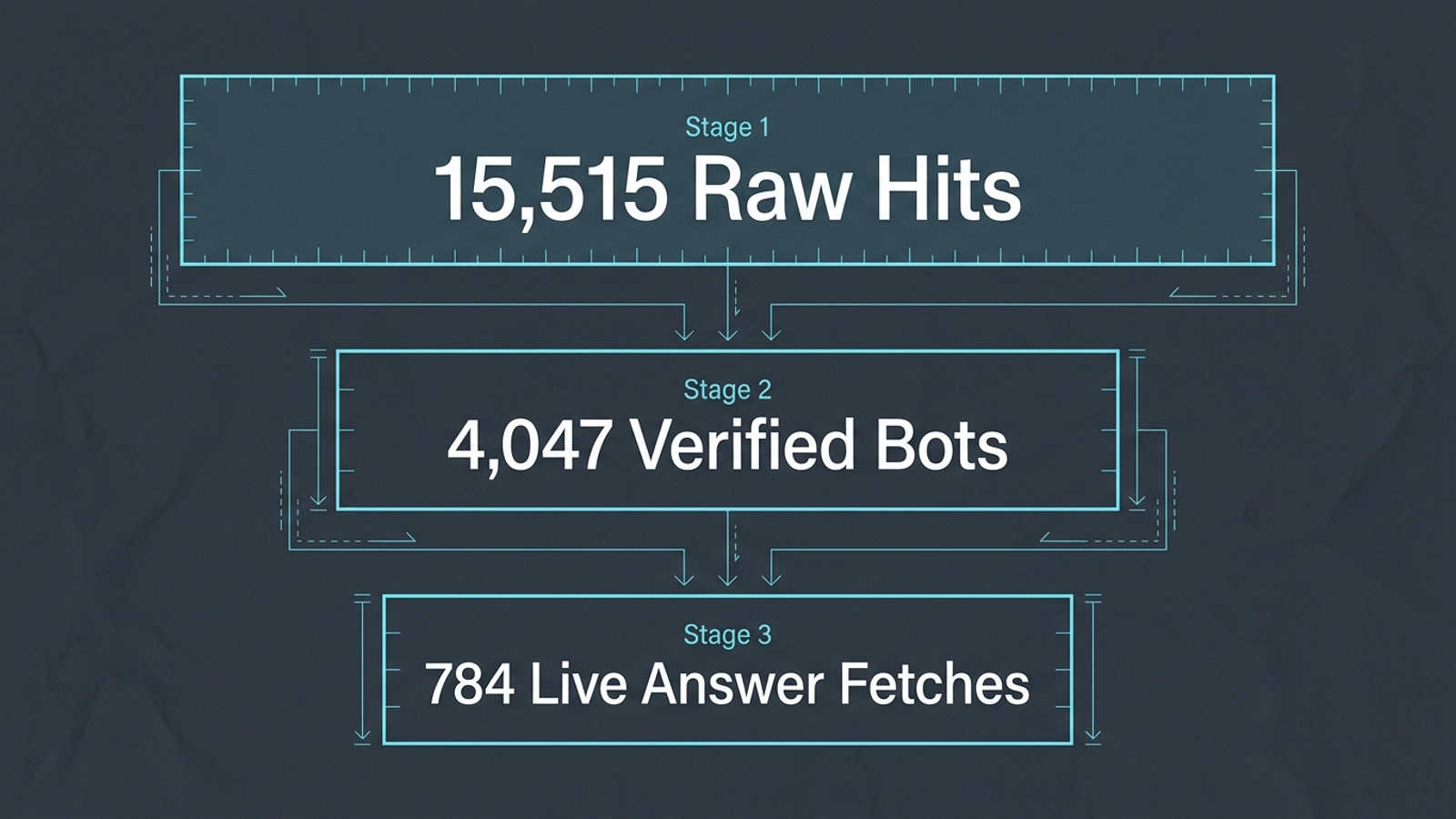
Expected result: Counts by verified identity, role, request path and HTTP status. In 30 days of raw harborfinch.com edge logs, 15,515 requests for robots.txt claimed bot identities; IP-feed and DNS checks verified 4,047. On the homepage, 6,330 visits claimed AI crawler identities; 1,916 were verified indexers, and 784 were verified ChatGPT-User fetches. Those last requests indicate live, user-triggered fetching. They do not tell you how many buyers saw an answer or whether your brand was named in it.
Mistake to avoid: Counting user-agent strings as proof, or looking for crawler visits in a JavaScript analytics tag. The requests you need to inspect live in server or edge logs. Check whether relevant paths returned 403 or 404, and whether the fetched HTML contained the content you meant to make available.
Step 5: Store the raw runs and schedule the next cycle
Action: Create prompts and evaluation_runs tables. On each run, save the prompt ID, engine, model, timestamp, parsed flags, citation domains and raw response. Keep verified crawler counts in a separate log-derived record; do not imply you can join a crawler hit to a particular generated answer.
CREATE TABLE prompts (
    id TEXT PRIMARY KEY,
    prompt_text TEXT NOT NULL,
    intent TEXT NOT NULL,
    competitors TEXT NOT NULL,
    version INTEGER DEFAULT 1
);

CREATE TABLE evaluation_runs (
    id INTEGER PRIMARY KEY AUTOINCREMENT,
    prompt_id TEXT REFERENCES prompts(id),
    engine TEXT NOT NULL,
    model TEXT NOT NULL,
    executed_at TIMESTAMP DEFAULT CURRENT_TIMESTAMP,
    brand_mentioned BOOLEAN NOT NULL,
    brand_cited BOOLEAN NOT NULL,
    ambiguous_flag BOOLEAN NOT NULL DEFAULT FALSE,
    competitor_mentions TEXT,
    citation_domains TEXT,
    raw_response TEXT
);
Run the collector every two weeks at a consistent time, such as Tuesday at 02:00 UTC, and spread each prompt’s five samples across several hours. If you use cron, schedule the entry weekly and have tracker.py skip Tuesdays that do not fall in its chosen two-week cycle:
0 2 * * 2 cd /path/to/tracker && /usr/bin/python3 tracker.py
Expected result: A queryable history that preserves what the engine returned even when an API field or extraction rule changes. At 30 prompts, five samples and three engines, that is 450 grounded requests per cycle. Review the first saved cycle by hand before leaving the job unattended.
Mistake to avoid: Letting a changed response format silently turn missing citations into False, or running the whole set daily because the scheduler makes it easy. Retain raw JSON and alert on unexpected fields. More frequent noise is still noise, only with a larger API bill.
Step 6: Report the rate with its uncertainty
Action: For each unbranded prompt and engine, count brand_mentioned across the five runs. Calculate a Wilson interval with scipy.stats.binomtest; keep citation rates alongside mention rates rather than folding them together.
from scipy.stats import binomtest

mentions = 4
runs = 5
interval = binomtest(mentions, runs).proportion_ci(
    confidence_level=0.95,
    method="wilson"
)
print(mentions / runs, interval.low, interval.high)
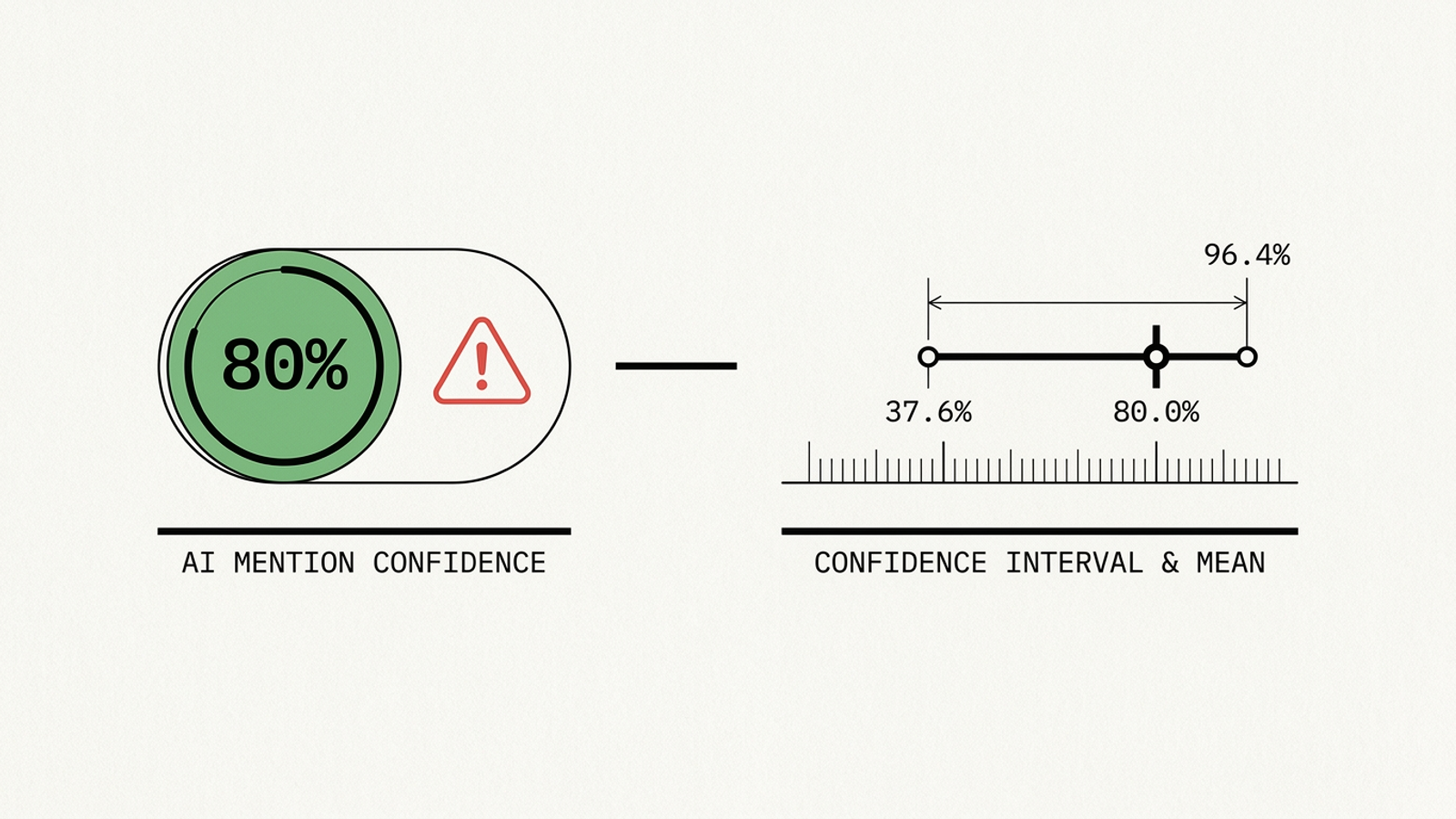
Expected result: A rate that does not pretend five observations are a census. Four mentions in five runs gives an observed 80%, but the 95% Wilson interval runs from about 37.6% to 96.4%. For a quick work queue, label five of five Consistently Captured, two to four Contested Ground, and zero to one Invisible. Those labels describe this sample, not a permanent rank.
Mistake to avoid: Announcing a win or rewriting a page over a small move inside that wide interval. Use a change of more than 15 percentage points sustained across two consecutive cycles as an investigation trigger, not proof that one edit caused it. The first useful report shows the prompt, engine, raw answers, mentions, citations and interval together.
Step 7: Give skipped prompts an owner
Action: Filter evaluation_runs for unbranded buyer prompts with no mentions across ChatGPT and Google AI Overviews. Read their citation_domains and the underlying answers. Then check verified indexer requests to the relevant pages for blocks, errors or missing rendered content. Fix retrieval failures before rewriting copy. If the engines repeatedly draw on third-party comparison pages, glossaries or discussions instead, work on the sources and entity context they actually use rather than assuming another corporate post will be found.
Expected result: A short work list tied to evidence: the prompt you missed, the sources the answer used, whether your pages were fetched successfully, and the next change to test. Repeat the same prompt set after that change so you can see whether its mention and citation records move.
Mistake to avoid: Treating one skipped answer as a content emergency. Wait for a zero-mention pattern across two consecutive cycles before starting a page rewrite, schema update or source-building campaign. Otherwise, you are optimising against a dice roll.
When maintaining the tracker costs more than using it
An in-house tracker buys you something a black-box score cannot: access to the prompts, runs, links and logs behind the number. If maintaining the scripts becomes the job, ask any commercial visibility vendor four questions before signing:
- Can you inspect and freeze the exact prompts, or does the score use a shifting pool?
- Does it repeat runs and show uncertainty, or report one answer as a stable position?
- Does it verify crawler IPs against DNS or published feeds, or count claimed user agents?
- Does it act on the gaps it finds, or leave your team with another spreadsheet?
That last question is where measurement stops being the hard part. A dashboard can show the gap; it cannot make a blocked page fetchable or turn a missing mention into attributable revenue. groas is built for the work after diagnosis: autonomous paid and organic search execution, with a named human strategist setting direction and accountability. If you want to run the tracker yourself, keep the prompt file frozen and start with the first verified gap. If you would rather not maintain the measurement-and-execution workflow, do not pay for a prettier scoreboard.