

 LinkedIn
Your brand is missing from an AI answer, and a dashboard wants a monthly fee to tell you so. I would start with the search terms report approach instead: log the buyer’s exact question, record what the engine answered, and inspect the pages it cited.
You do not need a platform to find your first AI citation gaps. A spreadsheet built like a PPC search terms report can show you which prompts mention your brand, which third-party pages appear instead, and which answers your site is missing. Do the manual audit once. Then decide whether it is worth automating.
What you will build, and what you need first
By the end, you will have an AI Search Terms & Gap Map: 30 unbranded buyer prompts tested in ChatGPT and Perplexity, three times each. That is 180 evaluations, plus a list of cited pages and a short backlog of fixes. You will not have a permanent visibility score. You will have a usable baseline.
Before starting, open:
- A blank Google Sheet.
- A logged-out private browser window for ChatGPT.
- A logged-out private browser window for Perplexity.
- Your sales objections, recorded demos, or paid search queries that led to closed revenue. Use what you have; do not invent buyer language from a positioning deck.
Step 1: Give each answer one clean row
Create a tab named Raw_Evaluations. Paste this header into cell A1, so it fills columns A through H. The fields follow an AEO logging schema documented by MaxAEO, adapted for search term mining:
Prompt Engine Run Number Brand Mentioned Position Sentiment Cited URLs Competitor Named
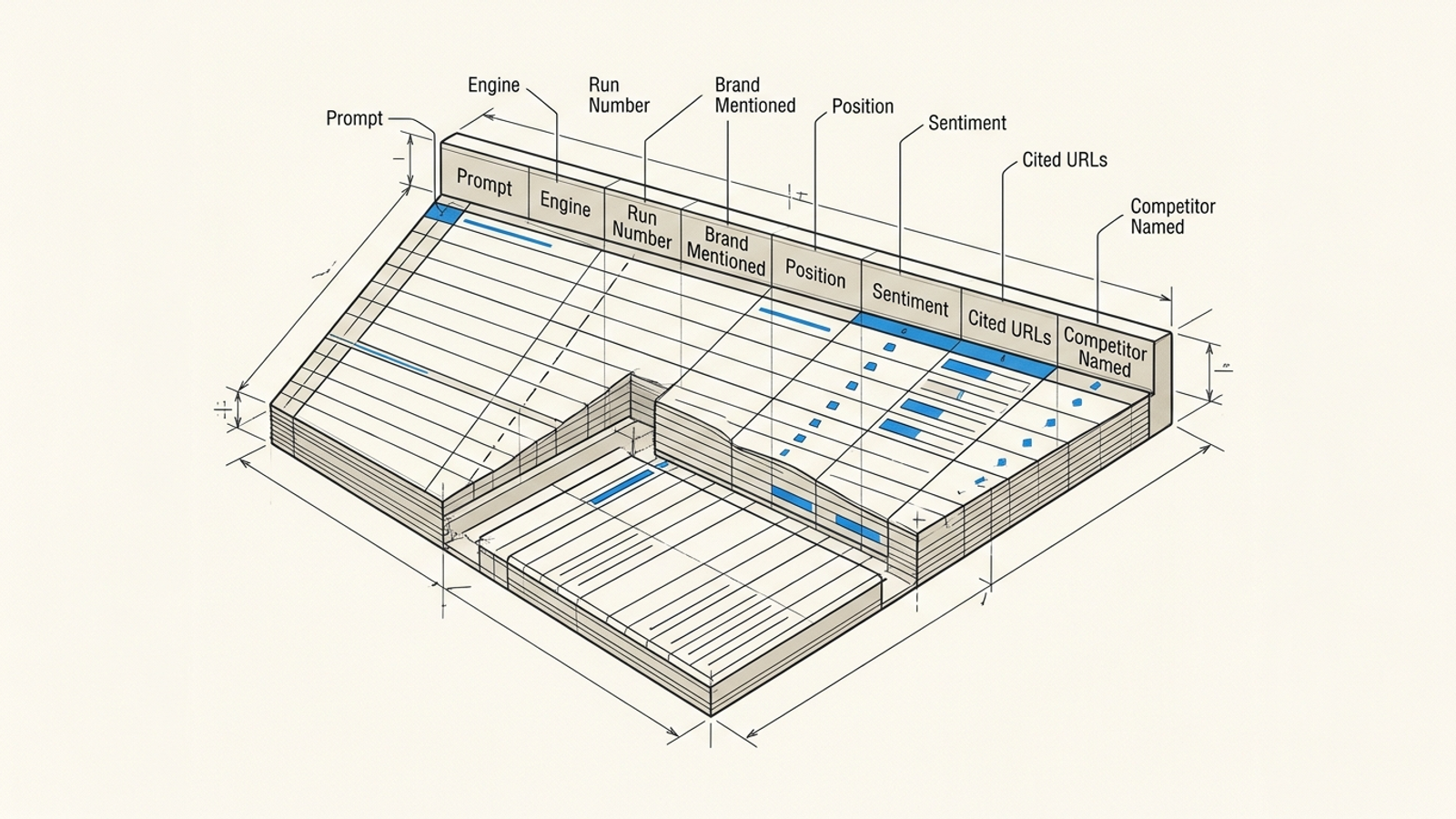
Set data validation in B2:B to a dropdown containing ChatGPT and Perplexity. Restrict C2:C to whole numbers 1 through 3. Set D2:D to checkboxes. In E2:E, enter the brand’s numeric position among recommendations: 1 if first, 2 if second, and 0 if absent. Use a Positive, Neutral, or Negative dropdown in F2:F; leave sentiment blank when the brand is absent. Put full citation URLs in G2:G, separated by semicolons, and rival products in H2:H. Add a free-text Notes header in I1 if something needs explaining.
Expected result: A header row and a consistent place for all 180 evaluations. The answers will occupy rows 2 through 181.
Mistake to avoid: Writing “mentioned near the bottom” in Position or “sort of” in Brand Mentioned. Keep the measured fields numeric or boolean. Put the nuance in Notes.
Step 2: Mine 30 prompts from buyer language
Pull questions from sales demos, CRM objection logs, and paid search queries tied to revenue. If you need to work back from your existing search data, use this walkthrough to find the buyer questions AI answers without you. Write 30 natural-language prompts and number them in a separate document. Split them into two batches:
- 15 commercial evaluations: Buyers comparing vendors or asking for recommendations, such as
best contract management software for legal teams under 50 peopleoralternatives to DocuSign for small firms. - 15 informational problems: Buyers trying to solve a task, such as
how to calculate redline turnaround time in WordorSOC 2 compliance requirements for customer contracts.
Keep the wording close to what a buyer would type. If a sales objection contains a useful constraint, such as team size or workflow, keep it. A category-wide prompt and a prompt for a small legal team do not ask the same question.
Expected result: Thirty numbered, unbranded prompts with enough specificity to reveal whether an answer fits your buyer.
Mistake to avoid: Testing how does Brand X compare to Brand Y and calling the resulting mention a discovery win. The prompt supplied the brand. Use non-branded questions for this audit.
Step 3: Test each prompt in both engines, three times
Start with prompt 1. Submit it to ChatGPT in a fresh private session, then fill one row in Raw_Evaluations. Record the prompt verbatim, set Run Number to 1, and mark whether your brand appears. Close the session. Open another fresh private session and repeat the identical prompt for runs 2 and 3. Do the same in Perplexity. Continue until all 30 prompts have six rows each.
Do not run three prompts in one conversation. Earlier questions can shape later answers, including what the assistant assumes about your company. Fresh sessions will not make the engines deterministic, but they remove one avoidable source of contamination. As this explanation of LLM answer variation describes, identical queries need not produce identical responses.
Read the three runs as a working classification, not a theory about the model’s internals:
- 3 of 3 mentions: Stable in this small test.
- 1 or 2 of 3 mentions: Intermittent. Check what changed between answers.
- 0 of 3 mentions: Absent from this test. Do not claim you have proved the site was never considered.
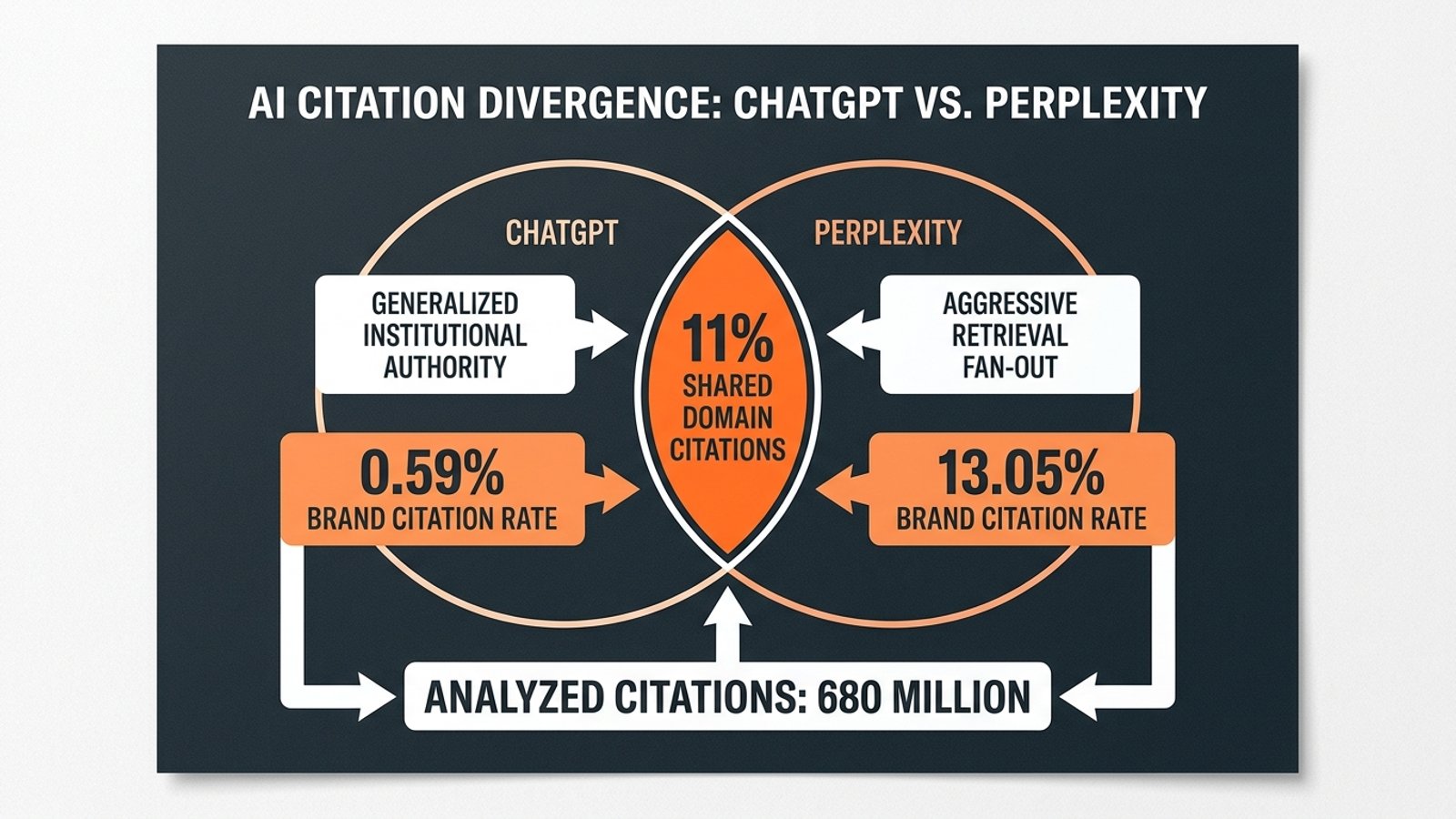
Keep the engines separate. A cross-engine citation study found limited overlap in the domains ChatGPT and Perplexity cite. More importantly for your sheet, an average across the two would hide an obvious action: a prompt might work in one engine and fail in the other.
Expected result: Rows 2:181 contain 180 evaluations: 30 prompts × 2 engines × 3 runs.
Mistake to avoid: Saving one favorable answer as a screenshot and calling it a baseline. If the next two runs omit you, that screenshot measured a moment, not a pattern.
Step 4: Capture the pages behind the answer
For every run, inspect any visible footnotes, source cards, or citation links. Open them and copy the destination URLs into Cited URLs, separated by semicolons. In Perplexity, use the citation chips above or within the answer. In ChatGPT, expand the available sources for the response. If an answer provides no cited URL, leave the cell blank. Do not turn an uncited statement into a source.
Capture exact pages, not just domains. g2.com tells you little; the comparison page an engine linked tells you what a buyer might read and what information that page contains. Note whether the cited page is your own, a competitor’s, or a third party’s. A practitioner citation analysis is one reason to look beyond vendor homepages, but your own URL list is what determines the work here.
Say a warehouse management prompt names three rivals and cites a comparison page, a forum discussion, and a trade article. That is a different problem from an answer that cites three rival pricing pages. Do not prescribe a new homepage section before checking which pages supplied the answer.
Expected result: A URL trail for each answer that offered citations, including the specific third-party pages appearing on prompts where your brand was absent.
Mistake to avoid: Copying a domain label instead of the linked page, or filling in a plausible source when the engine supplied none. Both make the later diagnosis look firmer than it is.
Step 5: Pivot the runs and count the cited pages
Create a tab named Gap_Map. First, add Mention_Flag in Raw_Evaluations!J1. Paste this into J2 and fill it down through J181:
=IF(D2,1,0)
In Google Sheets, select the range Raw_Evaluations!A1:J181 and choose Insert > Pivot table. Put the pivot on Gap_Map. Set Prompt as Rows, Engine as Columns, and Mention_Flag as Values, summarized by AVERAGE. Format the values as percentages. Because each prompt has three runs per engine, the cells should read 0%, 33%, 67%, or 100%.
Next, create a tab named Cited_Pages with headers URL, Prompt, Engine, Brand Mentioned, and Cited Domain in columns A through E. For every URL in Raw_Evaluations!G2:G181, create one row per URL here. Copy the prompt, engine, and checkbox result from its evaluation row. If one answer cited four URLs, it needs four rows. Paste this formula into E2 and fill it down:
=IFERROR(REGEXEXTRACT(A2,"^(?:https?://)?(?:www\.)?([^/?#]+)"),"")
That extracts the host from each URL. It does not magically split a semicolon-separated cell: the one-URL-per-row work is why Cited_Pages exists. Build a second pivot from this tab with Cited Domain as Rows and a count of URL as Values. Filter Brand Mentioned to FALSE, then sort the count descending. Keep the underlying URLs; a domain count alone cannot tell you which page to inspect.
Expected result: One view shows mention rates by prompt and engine. The other shows which cited domains recur when your brand is missing. A 0% prompt deserves inspection; a 33% or 67% prompt gives you a before-and-after test candidate.
Mistake to avoid: Extracting only the first domain from each semicolon-separated Cited URLs cell and calling the result a citation count. That quietly discards every other source in the answer.
Step 6: Assign a fix to each gap
Create an Action_Matrix tab. Start with prompts at 0% or intermittent visibility, then inspect their cited URLs alongside the relevant pages on your site. Give each prompt one primary diagnosis:
- Missing answer page: You have no dedicated URL that addresses the buyer’s criteria. If the prompt asks for contract management tools for boutique law firms and your site offers only a broad enterprise features page, draft a page that answers the smaller team’s actual comparison. Assign the proposed URL in the matrix.
- Weak page structure: You have a relevant URL, but its direct answer is buried beneath introductory copy. A study of ChatGPT citations and page content makes the top of the page worth checking first. Move the relevant pricing, limits, workflow, or feature answer into a clear, readable section near the top. Use the AI citation gap audit to inspect the skipped URL before rewriting it.
- Third-party citation deficit: The cited answers lean on forums, directories, reviews, or comparison pages where your brand is absent or poorly represented. Inspect those exact pages. Update a relevant directory profile, participate transparently in a relevant discussion, or pursue inclusion in a comparison page. Do not assume another post on your own site will replace a third-party citation.
Prioritize prompts tied to buyer intent and repeat appearances of the same cited page. If several missing-brand answers point to one comparison URL, that is a more focused task than “improve AI visibility.” An audit of Perplexity commercial-search citations also illustrates why vendor product pages are only one part of the citation picture. Your sheet tells you which part matters for your prompts.
Expected result: A backlog of 10 to 15 editorial or off-page tasks, each attached to a prompt, a diagnosis, and a page or platform target.
Mistake to avoid: Labeling every 0% row “write a blog post.” The cited URLs may point to a buried answer on your site or a third-party page you need to address instead.

What the finished gap sheet should look like
Use the layout below as a format example, not measured results. Replace every percentage and source with your own logged runs before assigning work.
| Buyer prompt | ChatGPT (3 runs) | Perplexity (3 runs) | Dominant cited source | Diagnosis | Immediate fix |
|---|---|---|---|---|---|
| Best contract management software for legal teams under 50 | 0% | 33% | g2.com/categories/... | Third-party citation deficit | Inspect the cited comparison page and update the relevant profile. |
| DocuSign alternatives with custom redline tracking | 0% | 0% | Competitor comparison page | Missing answer page | Draft a page addressing the redlining workflow. |
| SOC 2 compliant e-signature pricing per seat | 0% | 67% | reddit.com/r/sysadmin/... | Weak page structure | Check whether the existing page states compliance and per-seat pricing clearly. |
| How to calculate contract turnaround time in Word | 100% | 100% | Owned /blog/turnaround page | Working baseline | Keep the URL in the next test cycle. |
The point is not to make the table look impressive. Every fix should trace back to a prompt, an observed answer, and a URL you can inspect. If you cannot follow that trail, you are back to guessing.
Verify the fixes, then stop doing busywork
Pick your top three intermittent prompts and make the assigned changes. Once the changed pages are available to the engines, repeat the same prompts, three times per engine, in fresh sessions. Keep the wording and logging rules fixed. Compare the new mention rates and cited URLs with your baseline. A move from 33% to 100% across three runs is encouraging; keep testing before treating it as a permanent win. If nothing moves, revisit the diagnosis rather than publishing a fourth version of the same page.
One manual pass is useful. Repeating it every week is another job. At 50 prompts, three engines, and three runs, you have 450 evaluations per cycle before you inspect a single citation. That is the same sort of mechanical work PPC operators used to dignify as “account stewardship” while mining negatives at 1 a.m.
A passive dashboard can save the logging without doing the fixing. That is the distinction I care about. groas takes the autonomous route: continuous search execution across paid and organic work, with a named human strategist setting direction and accountability. Use the spreadsheet to find the first gaps and test the first fixes. The first thing to change once it works is the workflow: stop making a person repeat the measurements and put that time into acting on what the answers show.